Sobre o Meeting Media Manager (M³)
Qual a finalidade deste aplicativo?
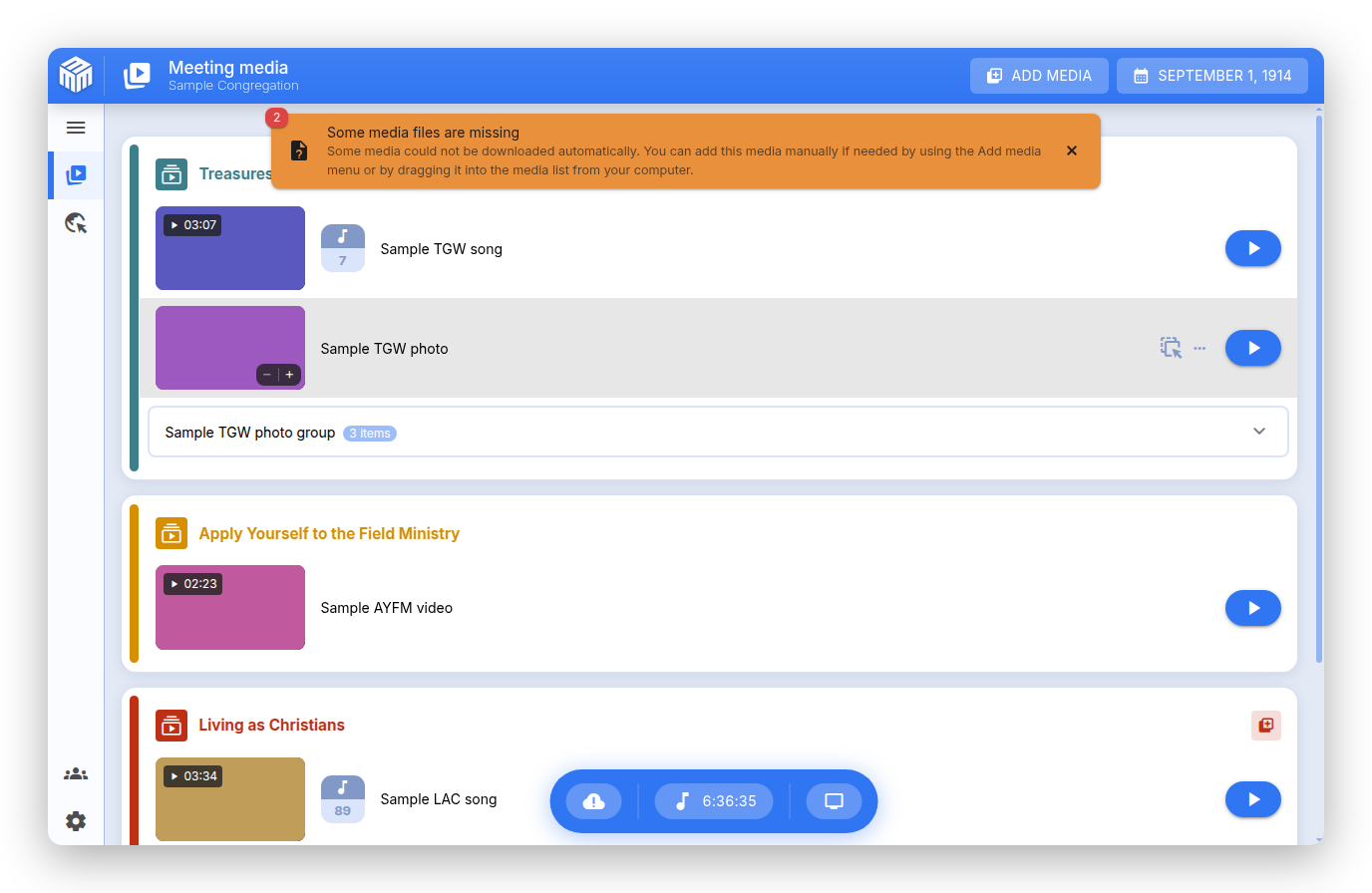
Meeting Media Manager, ou M³ para abreviar, é um aplicativo completo e multiplataforma para Windows, macOS e Linux que baixa, organiza e apresenta fotos e vídeos para as reuniões congregacionais das Testemunhas de Jeová. Suporta vários idiomas disponíveis no site oficial das Testemunhas de Jeová e oferece ferramentas poderosas para gerenciar mídias durante reuniões híbridas e presenciais.
O M³ oferece suporte para gerenciar mídias de reuniões normais e personalizadas, múltiplas congregações e/ou grupos usando a mesma conta do computador, além de recursos avançados de apresentação que tornam fácil o compartilhamento de.
Nota
Este aplicativo era conhecido como JWMMF (JW Meeting Media Fetcher), mas foi renomeado para Meeting Media Manager em maio de 2022.
Por que escolher o M³?
O M³ é a ferramenta mais completa para gerenciar as mídias das reuniões, oferecendo uma experiência suave, confiável e com muitos recursos em diversas plataformas. Ele foi desenvolvido especificamente para as necessidades das reuniões de congregação e oferece tudo o que é necessário para uma apresentação de mídia eficaz.
Principais benefícios
Apresentação de mídia sem esforço: A melhor forma de apresentar mídias — apenas abra o M³ e está tudo pronto. Não são necessárias configurações complexas ou etapas extras.
Suporte para várias congregações: Gerencie facilmente configurações para diversas congregações ou grupos dentro de um único aplicativo.
Recursos avançados: Adicione facilmente mídias extras, importe conteúdos personalizados e compartilhe automaticamente o que acontece no Salão do Reino com os participantes no Zoom.
Desempenho otimizado em várias plataformas: Desfrute de uma experiência suave e responsiva no Windows, macOS e Linux, mesmo em sistemas antigos ou computadores com recursos limitados.
Confiável e estável: Feito para funcionar bem quando você mais precisa. Encontrou um problema? Reporte-o e ele será tratado rapidamente.
Ferramentas avançadas de apresentação: Controles avançados de mídia, recursos de zoom e movimentação, temporização personalizada e integração perfeita com Zoom e OBS Studio.
O que o M³ faz?
O M³ é uma solução completa de gerenciamento de mídias que permite baixar, sincronizar, compartilhar e apresentar todas as mídias das reuniões de forma fácil e automática. Veja o que torna o M³ poderoso:
Recursos essenciais de gerenciamento de mídia
- Download automático de mídias: Baixa automaticamente todas as mídias necessárias para as próximas reuniões
- Suporte a múltiplos idiomas: Baixe mídias em qualquer um dos centenas de idiomas disponíveis
- Cache inteligente: Sistema de cache inteligente que mantém as mídias organizadas e atualizadas
- Organização de mídias: Organiza automaticamente as mídias por data e seção da reunião
Recursos de apresentação de mídia
Para reuniões congregacionais híbridas ou presenciais, o modo integrado de apresentação de mídia inclui:
- Controles avançados de mídia: Miniaturas de mídia com recursos de zoom e movimentação
- Temporização personalizada: Defina pontos de início e fim específicos para a reprodução da mídia
- Controles de reprodução: Botões de pausar/reproduzir/parar fáceis de usar, com atalhos de teclado
- Pré-visualização ao vivo e controle de velocidade: Veja uma prévia do que a assistência está vendo e, se quiser, ajuste a velocidade de reprodução de áudio ou vídeo
- Suporte a múltiplos monitores: Detecção e gerenciamento automático de monitores externos
- Apresentação limpa: Interface de apresentação de mídia sem distrações
Cânticos de fundo
- Reprodução inteligente: Cânticos de fundo que param automaticamente antes do início das reuniões
- Reinício com um clique: Retome os cânticos de fundo com um único clique após as reuniões
- Controle de volume: Volume ajustável dos cânticos de fundo, com recurso de fade-out
Integração com Zoom
- Compartilhamento de tela automático: Inicie e interrompa o compartilhamento de tela no Zoom automaticamente ao reproduzir ou parar a mídia
Integração com OBS Studio
- Troca automática de cenas: integração sem interrupções com o OBS Studio para reuniões híbridas
- Gerenciamento de cenas: Troca automática entre câmera, mídia e outras cenas
- Controles de gravação: Inicie e pare gravações do OBS pelo M³, quando ativado
Importação e Gerenciamento de Mídias
- Arquivos JWPUB: Importe e gerencie arquivos JWPUB facilmente
- Arquivos JWLPLAYLIST: Suporte para arquivos de playlist do JW Library
- Mídia personalizada: Importar vídeos personalizados, imagens, arquivos de áudio e PDF.
- Mídias da Bíblia: Importe mídias da Bíblia de estudo, mídias da Bíblia em língua de sinais e gravações em áudio da Tradução do Novo Mundo
- Discursos públicos: tenha sempre uma visão geral da mídia de discursos públicos pronta para uso com o importador do S-34
Recursos Avançados
- Pasta compartilhada: Adicione mídias às reuniões automaticamente a partir de uma pasta sincronizada pelo Dropbox, OneDrive, iCloud Drive ou Google Drive
- Exportação de mídia: Exportar mídias automaticamente para pastas, organizadas por data
- Apresentação do site: Apresente o site oficial em monitores externos
- Temporizador da reunião: Janela opcional de temporizador para controlar o tempo das partes da reunião
- Auxiliares de gravação da reunião: Controle a gravação do OBS ou um aplicativo de gravação externo
- Atalhos de teclado: Atalhos de teclado personalizáveis para muitas funções
- Vários perfis: Gerencie diferentes congregações ou grupos com perfis separados, incluindo a importação e exportação das configurações de perfil
O M³ está disponível no meu idioma?
Sim! O M³ oferece suporte abrangente em vários idiomas:
Mídias para as reuniões das Testemunhas de Jeová podem ser baixadas automaticamente em quaisquer dos centenas de idiomas disponíveis no site oficial das Testemunhas de Jeová. A lista de idiomas disponíveis é sempre atualizada; tudo que você precisa fazer é selecionar qual você precisa durante a configuração.
Idiomas de interface
O próprio M³ foi traduzido para vários idiomas por voluntários. Você pode escolher o idioma da interface do M³, independentemente do idioma usado para baixar as mídias. Isso significa que você pode usar o M3 no seu idioma de preferência, enquanto baixa mídia em qualquer outro idioma suportado.
Para detalhes sobre idiomas alternativos e legendas, consulte as Perguntas frequentes.
Requisitos de Sistema
Para sistemas operacionais suportados e requisitos, consulte as respostas nas Perguntas frequentes.
Experimente hoje o M³ e veja com os próprios olhos o que ele pode fazer! A exibição de mídias nas reuniões congregacionais nunca foi tão fácil.